
The fastest way to protect revenue from coding errors is to fix registration accuracy first, add concurrent coding checks before claims go out, and track a small set of KPIs weekly. Independent practices that skip straight to "more audits" without shoring up the front end usually keep bleeding money.
The 3-step action plan:
- Repair registration and eligibility accuracy at check-in.
- Enforce concurrent coding review before claims submission.
- Monitor coding KPIs weekly, not quarterly.
Top wins to implement this week:
- Run a pre-bill audit on your 20 highest-volume CPT codes.
- Build a modifier quick-reference sheet for front-line coders.
- Pull your denial report and tag every rejection by root cause.
Key Takeaways
Protecting revenue from coding errors requires fixing registration accuracy, enforcing concurrent coding review, and tracking clean-claim and coding error rates weekly.
| Point | Details |
|---|---|
| Fix the front end first | Registration and eligibility errors upstream cause coding errors downstream. |
| Watch two KPIs weekly | Clean-claim rate and coding error rate reveal leakage before denials pile up. |
| Common errors repeat in patterns | Missing modifiers and mismatched diagnosis/procedure pairs cause the most denials. |
| Batch your corrections | Group claims by error type when correcting and appealing to save staff hours. |
| Himshield finds gaps before submission | The platform scans EHR data, quantifies leakage by provider and payer, and drafts one-click corrections. |
Table of Contents
- How Coding Errors Drain Practice Revenue
- What Are the Most Common Coding Errors That Cost You Money?
- What Preventive Controls Stop Coding Errors Before Claims Go Out?
- Which KPIs Show You're Losing Revenue to Coding Errors?
- What Should You Do When You Find a Coding Error?
- Your 30/90/180-Day Plan to Protect Revenue
- When Should You Automate Coding Error Detection?
- What Independent Practices Get Wrong About Coding Protection
- How Himshield Protects Your Practice Revenue From Coding Errors
- Frequently Asked Questions
- Sources
How Coding Errors Drain Practice Revenue
Coding sits in the middle of the revenue cycle, and a mistake there travels downstream fast: registration feeds coding, coding feeds charge entry, charge entry feeds claims, and a bad claim becomes a denial that eats staff time for weeks. A wrong CPT code entered at charge entry doesn't just cost that one claim. It triggers a chain of rework, resubmission, and possible audit review.
The scale is bigger than most administrators assume. Industry analysis suggests practices may lose roughly 1 to 5 percent of annual revenue to preventable coding issues, and about 15% of claims get denied on first submission, many tied directly to coding or documentation gaps. Structured revenue cycle management processes exist precisely because coding errors compound into:
- Appeals staff time that could go toward new patient volume.
- Payer audits triggered by repeat error patterns.
- Longer days in accounts receivable while claims sit in rework.
What Are the Most Common Coding Errors That Cost You Money?
Seven error types account for most of the revenue leakage independent practices see: upcoding or undercoding, missing or incorrect modifiers, mismatched diagnosis and procedure codes, unbundling, expired or invalid codes, coding before documentation is finalized, and missed billable services.
- Upcoding or undercoding: A visit coded one level too low leaves reimbursement on the table every single time it repeats.
- Missing or incorrect modifiers: A missing modifier 25 on an E/M service billed with a procedure often triggers an automatic denial.
- Mismatched diagnosis and procedure codes: An ICD-10 code that doesn't support medical necessity for the CPT billed gets flagged before it ever reaches payment.
- Unbundling: Billing components separately that should be bundled under one code invites a payer clawback later, even after the claim pays.
- Expired or invalid codes: Using a deleted or outdated code from last year's ICD-10 code set is an automatic rejection.
- Coding before documentation is final: Locking a code before the provider signs off on the note creates a mismatch auditors catch fast.
- Missed billable services: A service performed but never captured on the claim is money that never gets billed at all.
Pro Tip: Run a five-minute pre-bill pair review on your top diagnosis/procedure combinations each morning. Catching a mismatched pair before submission is far cheaper than fighting a denial three weeks later.
What Preventive Controls Stop Coding Errors Before Claims Go Out?
The highest-impact controls to start with registration accuracy, standardized documentation templates, concurrent coding review, pre-bill audits, and ongoing coder training. Get these five right, and you close most of the gaps that create denials in the first place.
Process changes to put in place:
- Lock registration fields (insurance ID, eligibility, referring provider) before the visit is scheduled.
- Require documentation templates for high-volume visit types so coders aren't guessing at intent.
- Add a concurrent coding review step for any claim above a defined dollar threshold.
- Build provider query templates so coders can request clarification without slowing the whole claim.
- Run daily pre-bill sampling on a rotating percentage of claims before they leave the building.
Who owns what:
- Front desk staff verify eligibility and demographic accuracy at check-in.
- Providers finalize documentation within 24 to 48 hours of the encounter.
- Coders apply concurrent review checks and flag ambiguous documentation.
- The revenue cycle manager owns the pre-bill audit sample and tracks corrective action.
Improving documentation quality and running regular audits are consistently the two levers that move denial rates fastest, ahead of quarterly audits alone. Coder training works best on a monthly cadence, tied directly to whatever your last audit or denial report flagged. A training session built around real, recent denials sticks better than a generic refresher on coding rules nobody remembers by Friday.
Pro Tip: Make pre-bill sampling a daily five-claim habit, not a monthly project. Small, frequent checks catch drift before it becomes a pattern across hundreds of claims.
Which KPIs Show You're Losing Revenue to Coding Errors?
Watch your clean-claim rate and coding error rate first. If either one drifts, everything downstream, denials, days in A/R, appeals volume, follows shortly after.
- Clean-claim rate: the percentage of claims accepted without correction; aim above 90%.
- Coding error rate: claims flagged for coding issues before or after submission; a rising trend signals a training or documentation gap.
- First-pass acceptance rate: claims paid on the initial submission with no rework.
- Denial rate by category: breaks denials into coding, eligibility, and authorization so you know exactly where to intervene.
- Days in A/R: a climbing number often traces back to coding rework, not payer slowness.
A useful dashboard groups these KPIs by provider, payer, and denial category, with a trend column showing week-over-week movement so a spike is visible before it becomes a pattern.
| KPI | Reviewed by | Frequency |
|---|---|---|
| Clean-claim rate | Revenue cycle manager | Weekly |
| Coding error rate | Coding lead | Weekly |
| Denial rate by category | RCM manager and providers | Monthly |
Pro Tip: Review clean-claim rate and coding error rate every week; save denial-by-category and days in A/R for a monthly deep dive. A KPI that trends the wrong way for two consecutive weeks should automatically trigger a retro audit, not wait for the quarterly review.
What Should You Do When You Find a Coding Error?
Stop further leakage first, then prioritize recovery on your highest-dollar claims. A single missed modifier repeated across 200 claims deserves attention before one isolated undercoded visit.
- Identify scope: pull every claim matching the error pattern, not just the one that surfaced it.
- Prioritize by revenue and risk: rank by dollar value and audit exposure.
- Correct claims: fix the code, get provider sign-off if documentation needs a query, and resubmit.
- Submit appeals: attach documentation that supports medical necessity and the corrected code.
- Track outcomes: log resubmission status until each claim resolves.
Evidence to gather for appeals:
- The original claim and denial explanation.
- Supporting documentation, including provider notes and any query responses.
- A documented audit trail showing when the correction was made and by whom.
Pro Tip: Batch corrections by error type instead of fixing claims one at a time. A single modifier fix applied to 40 similar claims in one sitting saves hours versus reworking each claim individually.
Your 30/90/180-Day Plan to Protect Revenue
A realistic 180-day goal is a measurable drop in your coding error rate alongside a clean-claim rate climbing past 90%.
Day 1 to 30:
- Front desk audits eligibility and registration fields on every new patient.
- Coders complete a baseline pre-bill audit on the top 20 codes by volume.
- RCM manager sets up weekly KPI tracking for clean-claim rate and coding error rate.
Day 31 to 90:
- Roll out documentation templates for the highest-volume visit types.
- Start concurrent coding review on claims above your set dollar threshold.
- Run the first monthly coder training session built around actual denial data.
Day 91 to 180:
- Complete a full annual coding review across all active code sets.
- Validate improvement: clean-claim rate above 90%, coding error rate trending down month over month.
- Formalize a quarterly coding compliance audit calendar.
Governance is simple: the revenue cycle manager owns the initiative and runs a 15-minute weekly standup with coding and front desk leads. Providers sign off on any documentation template changes before rollout.
When Should You Automate Coding Error Detection?
Repeated denials on the same code patterns, a coding team stretched thin, or rising days in A/R all signal it's time to add automation or a specialist platform, not more manual audits.
Before signing with any vendor, verify: EHR integration depth, automated risk detection accuracy, documentation quality scoring, pre-submit correction workflows, and audit-defense output quality. HFMA's peer-review categories for revenue cycle solutions, including coding and denial management, offer a solid baseline for what "capable" looks like.
- Does the platform connect directly to your EHR, or require manual export?
- How fast does it flag a risk, before submission or after denial?
- What does the audit-defense output actually include?
Pro Tip: Ask any vendor for a sample audit-defense packet before you sign. If they can't show you one, they can't produce one when a payer comes calling.
What Independent Practices Get Wrong About Coding Protection
The fastest wins rarely come from adding more audits. They come from fixing what feeds the coder in the first place.
Three pitfalls show up again and again. Practices lock documentation before the provider finishes the note, guaranteeing a mismatch. They treat coder training as an annual event instead of a response to last week's denials. And they measure days in A/R monthly, by which point the damage from a bad coding pattern is already three months deep.
Start this week by pulling your last 30 days of denials and tagging each one by root cause. The pattern will tell you exactly where to point your first fix.
How Himshield Protects Your Practice Revenue From Coding Errors
Himshield finds coding, documentation, and charge-capture gaps in your EHR data before claims go out, then quantifies exactly what each gap is costing you by provider and by payer.
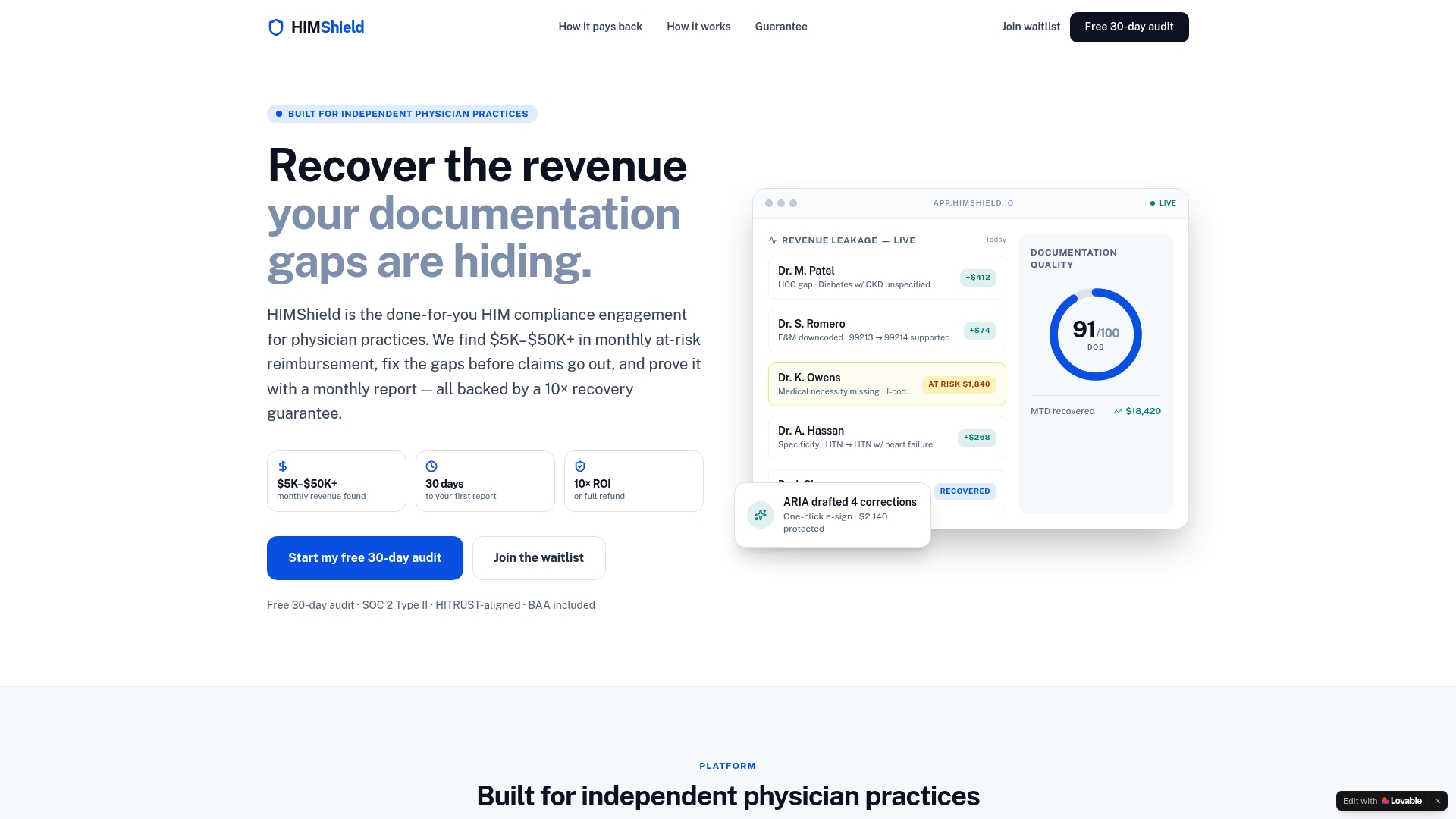
A free 30-day audit connects to your EHR, scans recent claims, and delivers a Revenue Leakage Report showing where money is slipping through. Here's what to expect:
- Per-provider, per-payer breakdown of at-risk reimbursement.
- Automated compliance alerts flagging documentation gaps before submission.
- One-click, physician-signable corrections instead of manual rework.
- Audit-defense packets assembled automatically if a payer comes calling.
Practices typically see $5,000 to $50,000 or more in hidden revenue once the audit runs. If you want to see what your own claims are quietly losing, request the free audit and have your EHR access and a recent denial report ready. You can also review how the integration works before you connect anything.
Frequently Asked Questions
What is the single most effective way to protect revenue from coding errors? Enforce concurrent coding review before claims leave the building. Catching a mismatched code or missing modifier before submission costs far less than fighting a denial afterward.
How much revenue do coding errors typically cost a practice? Industry analysis points to roughly 1 to 5 percent of annual revenue lost to preventable coding issues, with many first-submission denials tracing back to coding or documentation gaps.
How often should a practice audit its coding? Run daily pre-bill sampling on a small claim percentage, monthly coder training tied to real denials, and a full annual coding review across all active code sets.
Can automation really reduce coding errors, or does it just flag them? A well-integrated platform does both: it flags risks before submission and can draft corrections for physician sign-off, cutting the manual rework that usually follows a denial.
What KPI should administrators check first each week? Clean-claim rate and coding error rate. Both move fastest when something's wrong, and both give you time to correct course before days in A/R climbs.

This article is general information, not a substitute for advice from a qualified financial advisor. Consult a qualified financial professional about your own circumstances before acting on anything here.
Sources
- Tulane Online — Revenue Cycle Management in Health Care
- HFMA — Healthcare Revenue Cycle Management (RCM)
- LexiCode — Medical coding’s impact on revenue cycle performance
- WRS Health — 7 ways to stop medical practice revenue loss