
Yes: integrate an AI-assisted coding audit tool now, but start as a pilot that runs parallel to your existing workflow and targets your highest-denial CPT and HCC codes before you touch a full rollout. Waiting for "someday" costs real money every billing cycle a gap goes undetected, and a phased pilot gives you proof before you commit budget.
Here is the immediate three-step move for an independent practice ready to act:
- Scope the pilot narrowly. Pick one or two providers and your top three denial categories (commonly E/M level selection, HCC recapture, and modifier errors), and pull recent claims for review.
- Start the pilot in parallel, not in place of, your current process. Let the audit tool flag issues on charts your coders have already touched so you can compare outputs directly.
- Track one metric religiously during the pilot: first-pass acceptance rate — the percentage of AI-flagged corrections your coders and physicians accept without edits. This single number tells you more about real-world accuracy than any vendor brochure.
If you want a vendor-backed starting point rather than building this from scratch, HIMShield offers a free 30-day audit with a performance guarantee, which lets you see actual per-provider revenue leakage numbers before any subscription commitment.
Key Takeaways
Integrating a coding audit tool works best as a scoped, parallel-run pilot that validates accuracy against your own charts before any full rollout.
| Point | Details |
|---|---|
| Start with a narrow pilot | Target two providers and your top denial categories, running parallel to your current workflow for 30 to 60 days. |
| Use statistically valid sampling | Follow OIG guidance and RAT-STATS for any finding that could suggest an overpayment obligation. |
| Plan integration and security together | Confirm BAA, TLS 1.2+, AES-256, and SOC 2 evidence before any patient data flows to the vendor. |
| Track first-pass acceptance rate | This single KPI reveals more about real-world accuracy than any vendor's advertised benchmark. |
| Consider HIMShield as your pilot vendor | Its free 30-day audit with a performance guarantee lets you see actual revenue leakage before subscribing. |
Table of Contents
- How to Integrate Coding Software Audit Tools Into Your Practice
- What Scope and Sample Size Should Your Audit Use?
- Connecting an Audit Tool to Your EHR: What to Check
- Who Reviews AI Suggestions Before They Go Live?
- How Accurate Are NLP and ML Coding Suggestions?
- What KPIs Prove the Integration Is Working?
- Turning Audit Findings Into a Defense Package
- Your 90-Day Pilot-to-Rollout Playbook
- What Should You Do Next?
- An Editorial Take on Why Most Pilots Fail Before They Start
- Start Your Free 30-Day Coding Audit
- Where to Verify These Standards and Findings
- Frequently Asked Questions
- Sources
How to Integrate Coding Software Audit Tools Into Your Practice
The business case is not subtle. Independent practices lose real dollars every month to coding errors, missed HCC capture, and denials that never get reworked, and most of that leakage is invisible until someone runs a structured audit.
Coding errors are not rare edge cases. Peer-reviewed and industry analyses of billing accuracy show meaningfully high error rates across specialties, and the same body of research on AI and ML applications in healthcare billing documents that manual coding and billing consume real physician and staff time. One time-driven costing study cited in that research found ambulatory billing processes averaging notable lengths of time and inpatient processes longer, with physicians themselves spending a significant amount of time per case on billing-related tasks. Multiply that across a panel of a few thousand patients and you are looking at hundreds of staff hours a year that could instead go toward patient care or higher-value coding review.
The upside runs the other direction just as clearly. NLP and machine learning models applied to unstructured clinical notes have produced high, though variable, coding accuracy along with measurable gains in revenue capture and faster claims processing in published studies. Automated audit tools that catch documentation gaps before submission reduce denials at the source rather than forcing your billing team to fight them after the fact, which shortens accounts receivable days and improves audit readiness simultaneously.
Pro Tip: Introduce the audit tool to your physicians as a resource that protects their documentation, not a scorecard that grades them. Research on provider education strategies shows that framing feedback as resource-oriented guidance rather than punitive correction measurably improves clinician receptiveness and follow-through on documentation changes.
What Scope and Sample Size Should Your Audit Use?
Before you configure any software, decide why you are auditing. A compliance-focused audit, a revenue-recovery audit, and a denial root-cause audit each pull different chart samples and ask different questions, and conflating them produces a report nobody can act on.
Guidance on physician practice audit programs lays out a clear starting framework: determine your audit purpose first, then choose your sample method to match it. That guidance recommends defining scope, selecting samples, and following OIG-aligned methodology before pulling a single chart.
- Set the objective. Compliance audits check documentation against coding rules; revenue-recovery audits hunt for undercoded or missed charges; denial root-cause audits trace a specific payer's rejection pattern back to its source.
- Choose judgment or probe sampling. Judgment sampling targets charts you already suspect are risky (new providers, high-RVU codes, recent EHR template changes). Probe sampling, done statistically, is what you need if a finding might trigger a payer refund conversation.
- Size the sample defensibly. The OIG generally recommends a small number of encounters per provider per federal payer per year for routine review, and when a probe sample suggests a real overpayment, use RAT-STATS, the OIG's own tool, to generate a statistically valid sample before extrapolating any dollar figure.
Skipping the statistical step is the single most common mistake independent practices make when they self-audit. An estimate built on 10 charts you picked by hand will not survive a payer's counterargument.
Connecting an Audit Tool to Your EHR: What to Check
Integration is where good intentions meet real infrastructure, and this is the step vendors tend to gloss over. Plan for four data pathways: FHIR reads for structured clinical data, HL7 v2 feeds for legacy ADT and lab messaging, billing exports from your practice management system, and clearinghouse interfaces for claim status. Most EHRs support some combination, but coverage varies widely by vendor and version.

Integration guidance from healthcare technology practitioners identifies three workable patterns, and the tradeoffs matter for a practice weighing speed against risk.
| Integration Pattern | How It Works | Best Fit |
|---|---|---|
| Real-time embedded | Suggestions appear inside the EHR via SMART on FHIR or CDS Hooks as the physician documents | Practices wanting immediate clinician feedback, willing to invest in deeper vendor setup |
| Post-encounter batch | Charts are pulled and audited after the visit closes, on a daily or weekly cycle | Practices prioritizing lower disruption and faster initial deployment |
| Hybrid | Batch review for volume, real-time alerts for high-risk flags only | Most independent practices during pilot and early rollout |
Guidance on AI medical coding integration recommends hybrid deployment for most practices because it balances accuracy against clinician workflow disruption, especially during a pilot when trust in the tool is still being established.
Security cannot be an afterthought bolted on after the build. Before any data flows, confirm your vendor will sign a Business Associate Agreement (BAA), encrypts data in transit with TLS 1.2 or higher, encrypts data at rest with AES-256, and can produce current SOC 2 audit evidence. Practical integration experience shows that missing encounter context, inconsistent FHIR implementations, and skipped abstraction layers are what defeat most deployments, not the initial connection itself. Run a proof-of-concept against real, de-identified data rather than a vendor demo environment. Sandbox environments routinely hide the messy stuff, duplicate encounters, free-text where a structured code was expected, and special characters that break parsers, that only shows up once real production data hits the pipe.
Who Reviews AI Suggestions Before They Go Live?
Technology alone doesn't recover revenue. The workflow around it decides whether physicians trust the tool or route around it.
Three human-in-the-loop models are common, and each fits a different risk tolerance:
- Real-time suggestion only: the tool flags a possible issue during documentation; the physician accepts, edits, or dismisses it on the spot.
- Coder review queue: flagged charts route to a coder for review before any change reaches the physician, which adds a layer of quality control at the cost of speed.
- Hybrid auto-apply: low-risk, high-confidence corrections apply automatically (a missing modifier, for instance), while anything touching diagnosis specificity or E/M level routes to a human.
Most independent practices land on the hybrid model once past the pilot, because it protects physician time without letting every low-stakes fix clog a review queue.
Assign roles explicitly rather than assuming everyone will figure it out. Physicians need a short orientation on how to read a flagged suggestion and why it appeared. Coders need deeper training on how to validate AI-drafted corrections against documentation. Billers need to understand how corrected codes flow into claims. Administrators need visibility into aggregate acceptance rates. A 30 to 45 minute session per role, repeated at 30 and 90 days post-launch, covers most practices adequately.
Pro Tip: When you roll feedback back to physicians, frame it as "here's a documentation pattern worth knowing about" rather than "here's what you got wrong." That resource-oriented framing is the same principle supported by provider education research, and it is the difference between a physician who engages with the tool and one who ignores its alerts.
How Accurate Are NLP and ML Coding Suggestions?
No coding audit tool is infallible, and any vendor who claims otherwise should raise a flag. NLP and machine learning models trained on clinical notes have demonstrated high but variable accuracy across specialties, with published research showing real gains in revenue capture and processing speed alongside acknowledgment that accuracy shifts by specialty, note complexity, and template consistency. A dermatology practice with structured templates will see tighter accuracy than a multi-specialty group with free-text-heavy documentation.
Validate before you trust. Run a parallel period, typically 30 to 60 days, where the tool's suggestions are compared against your coders' independent work on the same charts without either side seeing the other's output first. Build a simple confusion matrix: where did the tool agree with your coder, where did it disagree, and who was right on manual review? Pull your sample across specialties and encounter types rather than one convenient subset.
Set a confidence threshold that triggers automatic escalation. Anything the model flags below your chosen threshold, commonly 85 to 90% confidence in vendor-reported benchmarks, should route to a human coder rather than auto-apply. Revisit that threshold and accuracy performance quarterly, not once at launch and never again.
What KPIs Prove the Integration Is Working?
You cannot manage what you don't measure, and a pilot without defined KPIs will produce anecdotes instead of a decision.
Track these five numbers from day one of the pilot:
- First-pass acceptance rate: the percentage of AI-flagged corrections accepted without edits by coders or physicians.
- Denial reduction percentage: compare denial rates for audited claims against a control group of unaudited claims from the same period.
- Recovered revenue: dollar total of corrected undercoding and caught documentation gaps, tracked per provider and per payer.
- Time-to-code: average minutes from encounter close to final code assignment, before and after integration.
- Accounts receivable days: the classic RCM metric, watched for movement as denial rework drops.
A simple ROI calculation makes the case concrete: if your coders currently spend 15 minutes per encounter on manual review and the tool cuts that to 5 minutes across 200 encounters a week, you have freed roughly 33 hours of coder time monthly, time that can go toward higher-value denial appeals or the next audit cycle. Layer recovered revenue from caught undercoding on top of that time savings, and most practices see a clear payback within one to two billing cycles.
Report these numbers to your physicians and administrators on a monthly cadence during the pilot, then quarterly once the tool is fully live. A simple dashboard beats a quarterly slide deck nobody reads.
Turning Audit Findings Into a Defense Package
An audit that only produces a spreadsheet of errors is half-finished. The real value comes from converting findings into documentation that would hold up if a payer or the OIG ever came asking.
A defensible audit package includes the sampled charts themselves, the decision rationale for each flagged issue, timestamps showing when the flag was raised and resolved, a complete audit trail of who reviewed what, and provider-facing notes explaining the correction in plain language.
From there, build a simple decision tree. Minor documentation gaps get remediated internally with provider education. Patterns suggesting a broader billing issue may warrant a voluntary payer disclosure. Findings that suggest systemic overpayment risk or potential fraud exposure need a compliance officer or outside counsel involved before you do anything else.
When a probe sample uncovers a pattern that looks like it could trigger a refund obligation, that is the moment to stop and get statistically valid numbers using a tool like RAT-STATS, not the moment to guess at an extrapolated dollar figure and hope it holds up.
If your findings touch potential overpayments tied to federal payers, this is general guidance, not legal advice. Consult your compliance officer or healthcare attorney before deciding whether self-disclosure is the right path for your specific situation.
Your 90-Day Pilot-to-Rollout Playbook
A structured pilot protects you from a rushed, all-at-once rollout that overwhelms your coders and erodes physician trust before the tool has proven itself.
- Weeks 1 to 2: Scope and setup. Select two providers, define your sample size, connect the tool in batch or hybrid mode, and confirm security documentation (BAA, SOC 2 evidence) is signed off.
- Weeks 3 to 6: Parallel validation. Run the tool alongside your existing coder workflow without letting it drive live decisions yet; build your confusion matrix and track first-pass acceptance rate weekly.
- Weeks 7 to 10: Controlled live use. Let hybrid auto-apply handle high-confidence, low-risk corrections while everything else still routes to a coder; measure denial reduction against your pre-pilot baseline.
- Weeks 11 to 13: Success review and sign-off. Compare all five KPIs against your baseline; the practice administrator and lead physician jointly decide whether to expand to the full provider panel.
Assign ownership clearly at the start: the practice administrator owns the timeline and vendor relationship, the lead coder owns the parallel validation review, and one physician champion owns clinician communication. Ambiguous ownership is the most common reason pilots stall past week six.
What Should You Do Next?
Three moves, in order: scope a narrow pilot around your two highest-denial code categories, run 30 to 60 days of parallel validation against your current coder workflow, and use that data to decide whether to expand or walk away.
Choose your pilot cohort deliberately. Pick providers with a mix of documentation styles, not just your most meticulous physician, so the validation data reflects your practice's real variability. Involve your lead coder and at least one physician champion from day one; a pilot run entirely by administrators without clinical buy-in tends to stall at rollout.
Pro Tip: Before signing any annual contract, ask the vendor for a free trial or audit period long enough to run a real parallel validation, 30 days minimum. A vendor confident in their accuracy numbers will not hesitate to prove it on your own charts first.
An Editorial Take on Why Most Pilots Fail Before They Start
The conventional advice on coding audit software focuses almost entirely on accuracy percentages and feature checklists, and that focus is misplaced. The practices that get real value from these tools are not the ones with the highest-accuracy vendor. They are the ones that treat the human workflow design with the same rigor as the technical integration.
Every failed rollout I have seen traced back to the same root cause: nobody defined who owns the review queue, so flagged charts sat unresolved until a biller escalated a growing backlog three weeks in. The technology worked exactly as advertised. The organization around it did not.
The other underestimated factor is how physicians receive feedback. A practice that frames every flagged chart as a mistake will train its physicians to distrust or ignore the tool within a month. A practice that frames the same flag as "here's a pattern worth a second look" gets physicians who actually engage with the corrections.
If you take one thing from this guide, let it be this: budget as much planning time for role assignments and clinician communication as you do for the FHIR connection. The integration checklist is solvable in a week. The change management is what determines whether the tool still gets used in month six.
Start Your Free 30-Day Coding Audit
You've read the framework: scope a pilot, validate accuracy, define ownership. HIMShield builds that framework directly into the platform, so you're not assembling it from scratch. The system scans your EHR data before claims go out, generates per-provider, per-payer Revenue Leakage Reports that quantify exactly where documentation gaps are costing you, and drafts corrections that physicians approve with a single e-signature rather than a rewritten note.
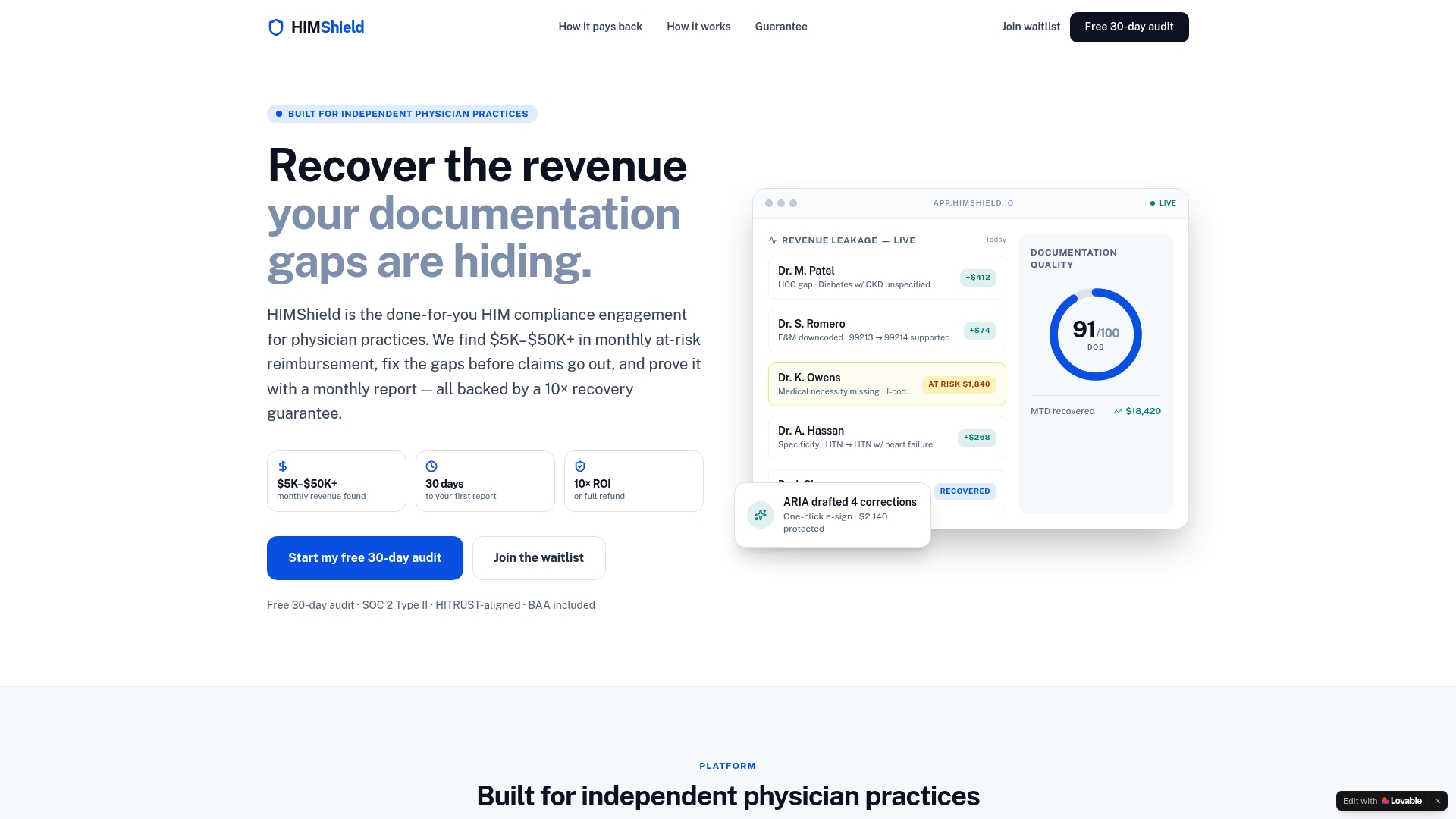
Every flagged issue comes packaged with the audit trail and provider-facing notes an examiner would expect to see, so if a payer audit does land on your desk, you already have a submission-ready response rather than a scramble. HIMShield's free 30-day audit comes with a performance guarantee: you see your practice's actual revenue leakage numbers before committing to a subscription. If you want to understand exactly how the connection to your EHR works before you start, see how the integration runs. Start the free audit today and get your first Revenue Leakage Report within the pilot window.
Where to Verify These Standards and Findings
The sampling methodology, integration patterns, and accuracy claims in this guide draw on the following sources, organized by what each one supports.
| Source | Supports |
|---|---|
| Physician practice audit program guidance | Audit scope definition, sample sizing, and OIG/RAT-STATS methodology |
| AI/ML in healthcare billing and coding (PMC) | Coding error rates, time-driven billing costs, and NLP/ML accuracy ranges |
| Provider education vs. resource guidance (PubMed) | Clinician-facing framing and change management approach |
| AI medical coding EHR integration guide | Integration pattern selection (real-time, batch, hybrid) |
| EHR integration problem analysis | Common technical integration failure points and proof-of-concept guidance |
Frequently Asked Questions
How long does it take to integrate coding software audit tools with an existing EHR? A batch-based pilot integration typically takes two to four weeks to configure, while a real-time embedded integration using SMART on FHIR or CDS Hooks can take six to eight weeks depending on your EHR vendor's FHIR support and your security review timeline.
Do coding audit tools require a Business Associate Agreement? Yes. Any vendor handling protected health information must sign a BAA before data flows begin, and you should also request current SOC 2 audit evidence and confirm encryption standards (TLS 1.2 or higher in transit, AES-256 at rest) as part of vendor evaluation.
What sample size does a defensible coding audit need? For routine annual reviews, OIG guidance generally points to five encounters per provider per federal payer per year. If a probe sample suggests a potential overpayment, use RAT-STATS to generate a statistically valid sample before calculating any extrapolated refund amount.
Will an AI coding audit tool replace my human coders? No. The most reliable model keeps coders in the loop, reviewing flagged suggestions and validating auto-applied corrections, while the software handles high-volume pattern detection that would take a human team far longer to catch manually.
How do I measure whether the integration is actually working? Track first-pass acceptance rate, denial reduction percentage, recovered revenue, time-to-code, and accounts receivable days from the start of your pilot, and compare all five against your pre-integration baseline at the 90-day mark.

This article is general information, not a substitute for advice from a qualified financial advisor. Consult a qualified financial professional about your own circumstances before acting on anything here.
Sources
- PubMed entry — provider education vs. resource guidance
- PMC article on AI/ML applications in healthcare billing and coding
- Physicianleaders
- Worldhealth