
A Place of Service (POS) code is a two-digit code placed in Item 24B of the CMS-1500 form (or its electronic equivalent in the ASC X12N-837 transaction) that tells payers exactly where a service was delivered. CMS maintains the official POS code set, and accurate use is required under HIPAA's Transaction and Code Set Rule. Before you submit any professional claim, confirm the POS code reflects the actual site of care, not the billing address.
Five codes you'll encounter constantly:
- 11 — Office
- 21 — Inpatient Hospital
- 22 — Outpatient Hospital
- 31 — Skilled Nursing Facility
- 10 — Telehealth in Patient's Home (code introduced in early 2022)
Pro Tip: Lock POS as a required, structured drop-down field in your EHR encounter template. Free-text entry is where errors start.
Key Takeaways
Accurate POS coding requires confirming the actual site of care, mapping it to the CMS code set, and locking that selection as structured data in your EHR before any claim is filed.
| Point | Details |
|---|---|
| POS drives payment rates | The same CPT code reimburses at different rates depending on facility vs. non-facility POS status. |
| HIPAA mandates standard POS use | Electronic claims must use CMS-defined POS codes in the ASC X12N-837 transaction. |
| Top audit triggers | POS 11 billed for hospital outpatient services and POS 32 used during Medicare Part A SNF stays are the most cited errors. |
| Lock POS in your EHR | Require a structured drop-down for encounter location to eliminate free-text entry errors at the source. |
| Himshield automates POS risk detection | Himshield scans EHR data for POS discrepancies and delivers per-provider Revenue Leakage Reports before claims are filed. |
Table of Contents
- What is place of service code, and why does it change your reimbursement?
- Key POS codes every coder should know
- How to determine the correct POS code before you file
- Common POS errors that trigger audits and how to fix them
- How to configure your EHR and train staff to prevent repeat errors
- Where to find authoritative POS guidance and monitor updates
- Himshield reduces POS risk before claims leave your practice
- What billing teams should prioritize first
- Sources
What is place of service code, and why does it change your reimbursement?
POS codes do more than describe a location. They determine whether a claim is paid at the facility (F) or non-facility (NF) rate, and that distinction can shift reimbursement for the exact same CPT code by a meaningful margin. A service billed under POS 11 (Office) typically pays at the higher NF rate because the practice bears overhead costs. Bill that same service under POS 22 (Outpatient Hospital) and the rate drops to the facility level, because the hospital is assumed to absorb overhead.
The HIPAA Transaction and Code Set Rule requires standard POS codes on all electronic professional claims, and CMS enforces this through the ASC X12N-837 standard. That makes POS accuracy a compliance obligation, not just a billing preference.
Audit bodies take it seriously. Noridian Medicare guidance warns that incorrect POS submissions have been flagged in contractor audits, with overpayment recovery demands following. The OIG has similarly cited POS discrepancies as a source of improper payments, particularly where providers billed non-facility rates for services delivered in inpatient or SNF settings. A single systematic error across hundreds of claims creates significant recovery exposure.
- POS drives F vs. NF payment status for the same CPT/HCPCS code.
- HIPAA mandates standard POS use on electronic claims via ASC X12N-837.
- OIG and Medicare contractors (including Noridian) audit POS accuracy and pursue overpayment recovery.
- Private payers may interpret POS codes differently from Medicare; verify each payer's rules before bulk submissions.
Pro Tip: Before a high-volume billing run, pull a sample of 10 claims and cross-check POS against the encounter location field in your EHR. Catching a systematic error at this stage costs minutes; catching it post-audit costs far more. See why practices lose reimbursement for the most common triggers.
Key POS codes every coder should know
The CMS POS code set and the HHS guidance document both publish the authoritative definitions. The AAPC also offers a downloadable POS reference appendix useful for offline lookup.
| Code | Name | Description |
|---|---|---|
| 01 | Pharmacy | Dispensing or administering drugs/biologicals |
| 10 | Telehealth in Patient's Home | Remote service delivered to patient at home, recognized by CMS since early 2022, with Medicare adoption following shortly thereafter |
| 11 | Office | Physician or other qualified provider's office |
| 12 | Home | Patient's private residence (non-telehealth) |
| 21 | Inpatient Hospital | Acute care hospital, admitted patient |
| 22 | Outpatient Hospital | Hospital-based outpatient department |
| 31 | Skilled Nursing Facility | SNF; use during Medicare Part A stays |
| 49 | Independent Clinic | Freestanding clinic not part of a hospital |
| 02 | Telehealth (Other than Home) | Remote service when patient is not at home |
Telehealth note: POS 10 and POS 02 are not interchangeable. POS 10 applies when the patient receives the telehealth service at their own home. POS 02 covers all other telehealth locations. Mixing them up can trigger a denial or an incorrect payment rate, as indicated by payer policies.
A few additional codes worth knowing:
- POS 32 (Nursing Facility) applies to long-term care residents not under a Medicare Part A SNF benefit. Using 32 when the patient is in a Part A stay is a common audit error noted by contractors.
- POS 49 (Independent Clinic) fits freestanding clinics that operate outside a hospital campus.
- POS 12 (Home) covers in-person home visits, distinct from telehealth.
How to determine the correct POS code before you file
The most common source of POS errors is a simple conceptual mistake: coders use the patient's registration address or the billing entity's address instead of the actual site of care. CMS is explicit that POS reflects the physical or functional location where the service was performed.
Follow this sequence for every encounter:
- Confirm the patient's location at the time of service. Was the patient physically present in your office, an outpatient hospital department, a SNF, or at home on a video call?
- Check payer coverage status. For Medicare patients in a SNF, determine whether they are under a Part A benefit (use POS 31) or a Part B benefit (use POS 32). HHS guidance advises verifying payer-specific rules before filing.
- Map to the CMS POS definition. Cross-reference the confirmed location against the official code set, not memory.
- Document the encounter location in structured EHR fields. Capture date/time, encounter type (in-person vs. telehealth), telehealth platform name if applicable, and the specific unit or department for facility encounters.
Questions to ask when coding:
- Was this service delivered in person or via telehealth?
- If telehealth, was the patient at home (POS 10) or another location (POS 02)?
- Is the patient admitted (POS 21) or in an outpatient department (POS 22)?
- Is the SNF stay under Part A or Part B coverage?
Pro Tip: Build a payer-specific POS mapping table for your five most frequent payers. One reference sheet eliminates repeated lookups and reduces coder-to-coder variation. For Medicare lab billing nuances, the ICD-10 for CBC with Diff Medicare guide shows how payer rules interact with code selection.
Common POS errors that trigger audits and how to fix them
Three errors appear repeatedly in OIG findings and Noridian audit guidance:
- POS 11 instead of POS 22: Provider bills office rate for a service performed in a hospital outpatient department, collecting the higher NF rate improperly.
- POS 32 instead of POS 31: Nursing Facility code used during a Medicare Part A SNF stay, which misrepresents coverage status and payment eligibility.
- Incorrect telehealth POS: POS 02 used when the patient was at home (should be POS 10), or vice versa.
Audit scenario: A provider group billed evaluation and management services with POS 11 for patients who were, at the time of service, admitted inpatients. Medicare contractors flagged the claims because inpatient professional services require POS 21. The result was an overpayment demand, corrected claims, and a repayment plan. The documentation gap: the EHR encounter type field was left blank, so there was no structured record to support the original billing.
Remediation steps when you identify a POS error:
- Pull all claims for the affected date range and CPT codes.
- Verify the correct POS against encounter records and facility logs.
- Submit corrected claims or voluntary refunds per payer timelines.
- Update EHR encounter templates to require a structured location field.
- Brief coding staff on the specific error pattern and add it to your next audit drill.
Pro Tip: Run a coding audit focused on POS codes quarterly. Thirty claims per provider is enough to surface a systematic pattern before it becomes a contractor inquiry.
How to configure your EHR and train staff to prevent repeat errors
System configuration is the fastest way to stop POS errors at the source.
System checklist:
- Add POS as a required, structured drop-down field on every encounter type.
- Build payer mapping rules into your billing system so the correct POS populates based on encounter location.
- Disable free-text entry for the location field.
- Set a claim-scrubbing rule that flags mismatches between encounter type and POS (e.g., telehealth encounter type paired with POS 11).
Testing before go-live:
- Run 20 test claims across your most common encounter types.
- Validate each POS against the CMS code set definition.
- Review any rejections or scrubber flags before opening to full volume.
Training topics (quarterly cadence recommended):
- POS definitions and the F vs. NF payment distinction
- Payer-specific nuances (Medicare Part A vs. Part B for SNF; telehealth payer policies)
- Documentation fields: Encounter Location, Encounter Type, Telehealth Platform, Facility Unit
- How to read and act on a denial that cites incorrect POS
Pro Tip: Standardize the EHR field names your team uses. Suggested fields: "Encounter Location" (drop-down), "Telehealth Platform" (text, required for POS 10/02), and "Facility Unit" (required for POS 21/22/31). Consistent field names make audits faster and denials easier to appeal. See modifier usage in physician billing for how modifiers interact with POS on the same claim line.
Where to find authoritative POS guidance and monitor updates
- CMS POS Code Set: The primary source for all code definitions and effective dates. Check here first when a code is unfamiliar or a new care setting emerges.
- CMS POS Codes page: Covers the HIPAA/ASC X12N-837 requirement and links to update notices. Subscribe to CMS email updates from this page.
- HHS Guidance Document: Reproduces CMS definitions and advises on payer-specific reimbursement checks.
- Noridian Medicare JE Part B: Contractor-level claims guidance and audit examples; essential reading for Medicare billers.
- AAPC POS Appendix (PDF): A printable quick-reference for coding teams.
- Annual Coding Review Guide: Practical checklist for aligning your EHR billing rules with the current code set each year.
Pro Tip: Set a calendar reminder for the first week of each quarter to check CMS for POS code updates. Telehealth codes in particular have shifted with regulatory changes; POS 10 itself became effective January 1, 2022, with Medicare availability following April 1, 2022.
Himshield reduces POS risk before claims leave your practice
POS errors are preventable, and Himshield is built to catch them before they reach a payer.
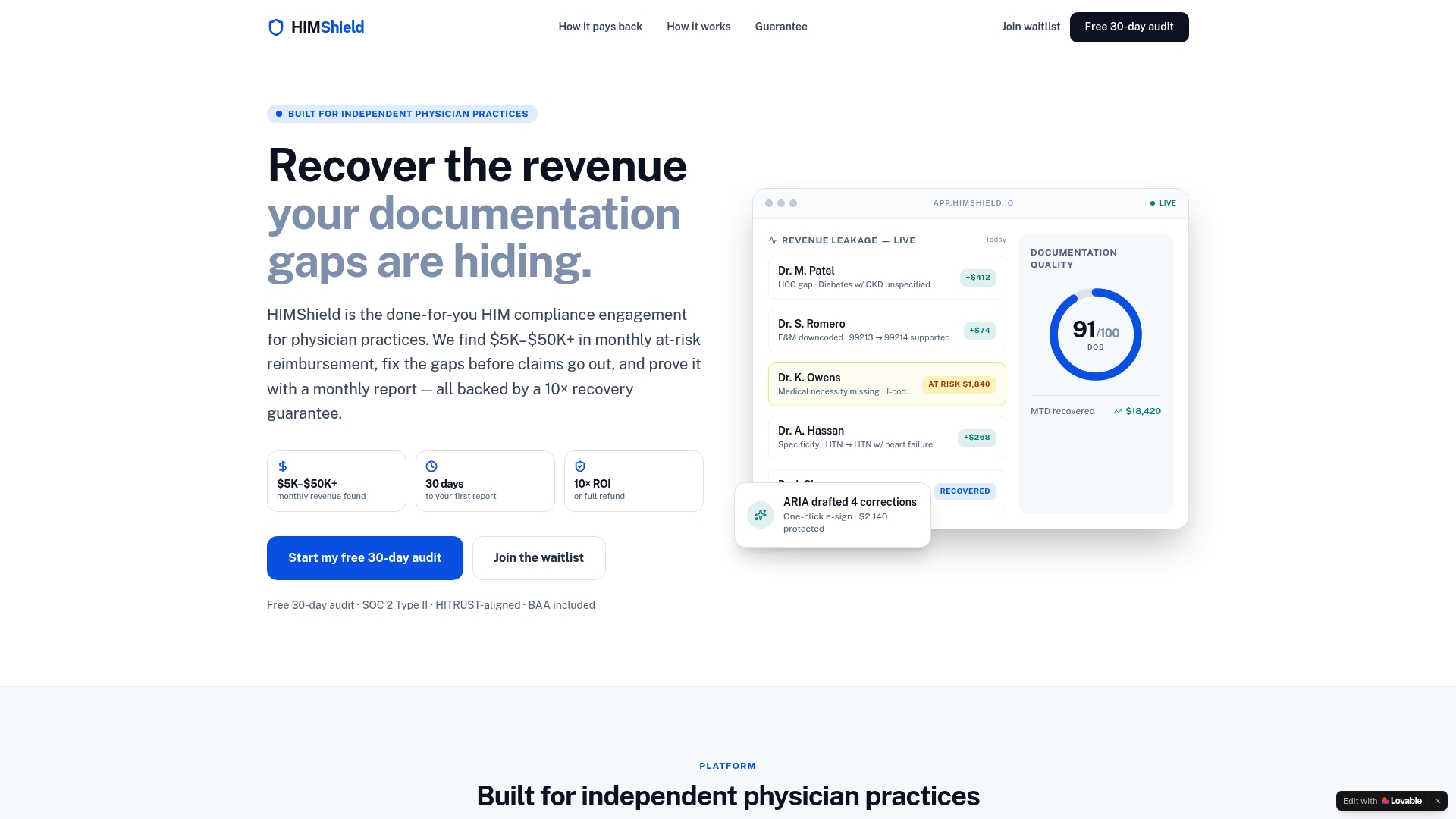
Himshield scans your EHR data and flags POS discrepancies automatically, including mismatches between encounter type and billed location, SNF coverage-status conflicts, and telehealth code errors. Each finding appears in a per-provider Revenue Leakage Report so you can see exactly where the exposure sits. When a correction is needed, Himshield auto-drafts the updated claim for physician e-signature with one click. If a payer or OIG contractor comes knocking, your audit-ready response package is already assembled.
The result: fewer denials, less overpayment exposure, and recovered revenue that would otherwise stay on the table. Start with a free 30-day audit at Himshield to see your practice's POS risk profile before the next billing cycle closes.
What billing teams should prioritize first
The three moves that matter most right now are a quick audit, EHR field locking, and a payer mapping table. Run a 30-claim POS spot check this week. Pick claims across at least three encounter types and verify each POS against the CMS code set. You will almost certainly find at least one pattern worth correcting before it compounds.
This week's action steps:
- Pull 30 recent claims and verify POS against encounter location records.
- Lock two EHR fields: Encounter Location (drop-down, required) and Encounter Type (drop-down, required).
- Schedule a 30-minute staff training on the F vs. NF distinction and the Part A vs. Part B SNF rule.
The OIG audit risk guide and medical coding compliance guide on the Himshield blog go deeper on documentation standards and audit preparation if you want to build out a full compliance calendar.
Sources
- Place of Service Code Set | CMS
- Place of Service (POS) - JE Part B - Noridian
- Guidance: CMS place of service code set | HHS
- Place of Service appendix (AAPC PDF)
- Place of Service Codes | CMS
This article is general information, not a substitute for advice from a qualified financial advisor. Consult a qualified financial professional about your own circumstances before acting on anything here.